
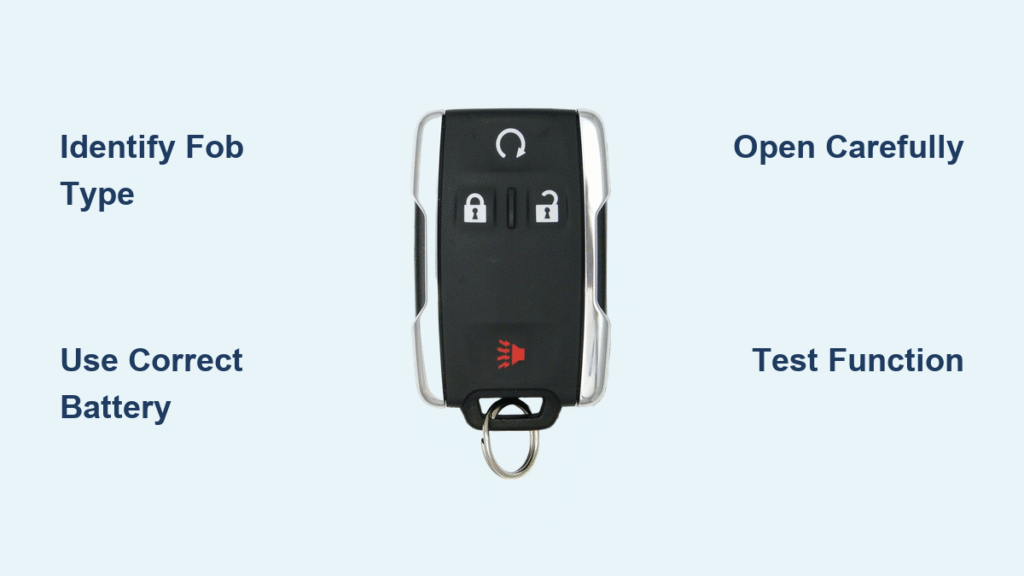
Your Chevy key fob suddenly needs three presses to unlock the doors, or the remote start barely works from your driveway. These frustrating moments signal a dying battery—something you can fix yourself in under five minutes. This guide walks through every Chevy key fob design from 2010-2024, showing exactly which battery you need and the quickest replacement method for each type. Knowing how to change battery in chevy keyless remote saves you $40 in dealer fees and prevents lockouts when you least expect it.
Identify Your Chevy Key Fob Type Before Opening
Standard Key Fob (2010-2019 Models): Recognize this classic rectangular design by its 4-5 buttons including lock, unlock, trunk, and panic. Check for a small notch on the bottom edge near the key ring—this is your entry point for battery access. These fobs dominate Chevy showrooms and require the most common battery type.
Flip-Key Remote (2010-2016 Models): This design features a physical key that flips out like a switchblade when you press the side button. The battery hides inside the key storage compartment, making replacement slightly different from standard fobs. If your key blade stores flush with the fob body, you have this model.
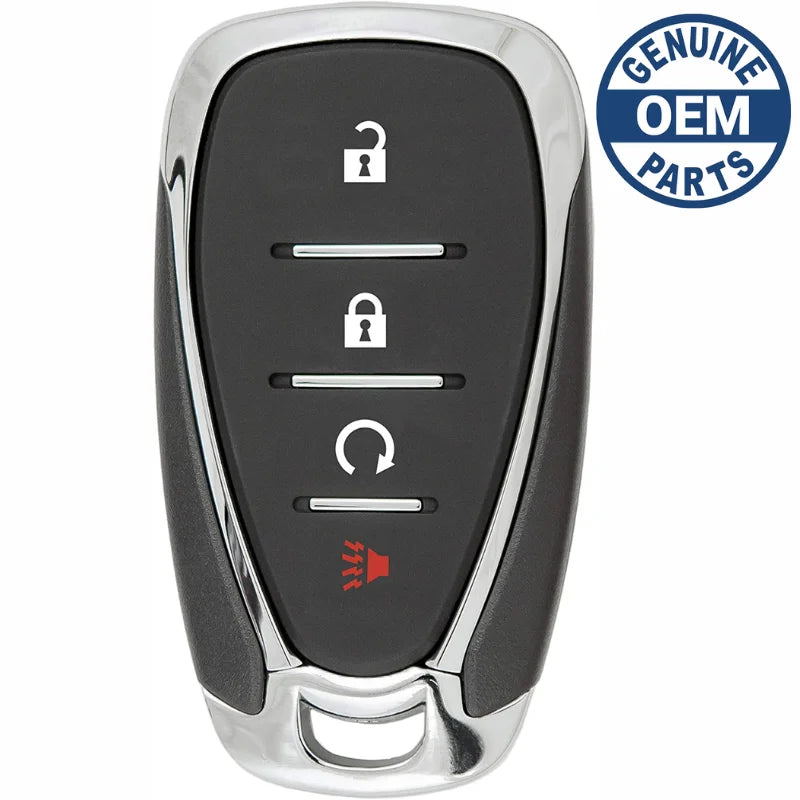
Smart Key Fob (2020-2024 Models): Spot these sleek designs by their lack of visible key blade and chrome accents. A small chrome button on the side releases an emergency key, and these newer models often require CR2450 batteries instead of the standard CR2032. Look for smooth edges and minimalist button layouts.
Remote Start Fob Identification: Find the extra circular button marked with a remote start symbol (usually a car with curved arrows). These drain batteries 30% faster due to two-way communication but follow similar replacement procedures as standard fobs.
CR2032 vs CR2450: Choose the Right Battery for Your Model
Critical Battery Differences You Must Know
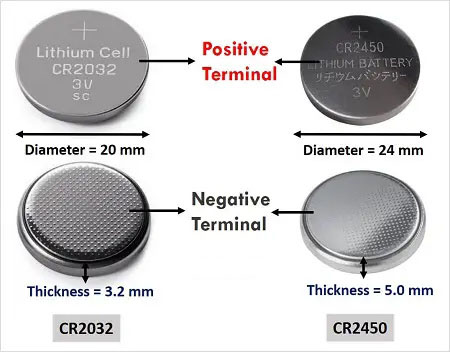
- CR2032: Powers 95% of Chevy fobs (2010-2024), 3V lithium coin measuring 20mm diameter × 3.2mm thickness
- CR2450: Required for 2021+ smart keys, larger 24.5mm × 5.0mm battery with nearly triple the capacity
- Wrong battery warning: CR2450 won’t fit in older fobs, while CR2032 lacks power for newer smart keys
Where to Buy Quality Replacement Batteries
- Auto parts stores: $4-8 per battery (check for Panasonic or Energizer)
- Walmart/Target: $3-6 for two-pack (ideal for keeping spares)
- Amazon: $8-12 for 5-pack (best long-term value)
- Avoid dollar store batteries: They often deliver only 60% of rated capacity
OEM vs Generic Battery Performance
While OEM GM Part #13502266 matches factory specs exactly, quality generic brands like Duracell or Rayovac perform identically in most cases. The critical factor is ensuring you get fresh stock—check expiration dates as lithium batteries lose 10% capacity per year in storage.
Essential Tools for Quick Chevy Key Fob Battery Replacement
Must-Have Tools:
– Small flathead screwdriver (or plastic pry tool to prevent scratches)
– New CR2032 or CR2450 battery matching your fob type
– Clean microfiber cloth for handling components
Pro Upgrade Tools:
– Needle-nose pliers for stubborn batteries
– 91% isopropyl alcohol for contact cleaning
– Multimeter to test old battery voltage
Critical Safety Note: Never use metal tools near the circuit board—static discharge can permanently damage your fob. Always work on a non-static surface like wood, not carpet.
Standard Chevy Key Fob Battery Replacement (2010-2019)
Open Your Fob Without Damage
- Locate the notch on the bottom edge near your key ring—it’s barely visible but essential for proper opening
- Insert screwdriver at 45-degree angle into the notch with firm but gentle pressure
- Twist slowly until you hear the first snap, then work around the edges if needed
- Separate halves carefully—don’t force it as plastic clips are fragile after years of use
Replace the Battery Properly
- Note orientation—positive (+) side typically faces up toward buttons (mark it with tape if unsure)
- Lift old battery using screwdriver tip under the retaining clip edge
- Clean contacts with dry cloth—corrosion causes 30% of post-replacement failures
- Insert new battery with identical orientation, pressing until it clicks under the clip
Reassemble and Verify Success
- Align halves starting at the key ring end where the notch was
- Press firmly around all edges until you hear multiple snaps
- Test immediately—stand 30+ feet away to check full range
- Confirm all functions—trunk release often fails first if battery orientation is wrong
Smart Key Fob Battery Replacement (2020-2024 Models)
Accessing the Battery Compartment
- Press chrome button firmly on the fob’s side to release the emergency key
- Remove key completely—this exposes a small slot underneath
- Insert key tip into the slot and twist gently counterclockwise
- Lift top section—newer models have a sliding battery tray instead of direct access
CR2450 Battery Installation Tips
Smart keys often use a sliding tray system—use tweezers to pull the tray out fully before swapping batteries. The CR2450 sits deeper than older models, so ensure it’s fully seated before closing. If your fob has a rubber seal around the battery compartment, clean it with alcohol to maintain water resistance.
Post-Replacement Troubleshooting That Actually Works
Fob Still Unresponsive? Try These Fixes
- Check battery voltage—anything below 2.8V needs replacement even if new
- Clean circuit board—use alcohol swab on all metal contacts (not the rubber buttons)
- Reset vehicle sync—sit in driver’s seat, turn ignition to ON without starting, hold UNLOCK for 15 seconds
- Test with spare fob—rules out vehicle receiver issues immediately
Programming Required for New Batteries?
Most Chevy fobs auto-sync, but if buttons fail after replacement:
1. Close all doors and sit in driver’s seat
2. Turn ignition to ON position (or hold smart key near start button)
3. Hold UNLOCK button for exactly 15 seconds
4. Turn ignition OFF and test all functions
5. Repeat once if initial attempt fails
Prevent Future Battery Emergencies With These Pro Tips
Battery Life Extenders
- Store spare battery in glove box (heat in center console kills batteries 50% faster)
- Check voltage annually—replace at 2.8V instead of waiting for failure
- Avoid temperature extremes—don’t leave fob on dashboard in summer
- Clean buttons monthly—dirt buildup drains battery through partial activation
Emergency Backup Plan
Always know your mechanical key location: standard fobs slide out from bottom, smart keys release via chrome button. Practice using it once a year—many owners can’t find it during actual emergencies. Keep the hidden key slot location memorized (usually in driver’s door handle).
When to Skip DIY and Call a Professional
DIY Success Indicators
- Battery replacement solves the problem immediately
- Fob works at full range after replacement
- No physical damage to fob casing or buttons
- Simple battery swap takes under 5 minutes
Professional Help Required If
- Fob still fails after proper battery replacement and reprogramming
- Visible water damage or corrosion inside the fob
- Buttons feel sticky or unresponsive after replacement
- You’ve lost all key fobs (requires dealer programming)
Cost Reality Check: DIY battery replacement costs $3-8 versus $20-40 for dealer service. But if you need a new fob, expect $150-400 at the dealership versus $25-80 for aftermarket options with proper programming.
Quick Reference Cheat Sheet for Chevy Key Fob Batteries
Standard & Flip-Key Fobs (2010-2020): CR2032 battery, notch on bottom edge, positive side up
Smart Keys (2021+): CR2450 battery, chrome button release, sliding tray system
Remote Start Fobs: Same battery as standard but check every 18 months
Time Required: 3-5 minutes once you identify your fob type
Keep a spare CR2032 battery in your glove box—it’s the difference between a 3-minute fix and a $40 dealer visit when your fob dies unexpectedly. Test your fob range monthly by standing at the edge of your driveway; if you need to move closer than usual, replace the battery immediately before complete failure. With this knowledge, you’ll never be locked out of your Chevy due to a dead key fob battery again.


