
Your Tesla’s battery health directly impacts how far you can drive and how well your car performs. Whether you’re monitoring your current vehicle or considering a used Tesla purchase, knowing precisely how to check Tesla battery health prevents costly surprises and protects your investment. Most owners experience minimal degradation during the first 50,000 miles, but understanding the right diagnostic methods helps distinguish normal wear from serious issues. This guide delivers the exact steps to assess your battery’s condition using tools you already have—no guesswork required.
Tesla App Battery Health Scan
The fastest method to check Tesla battery health takes less than two minutes using the app you already carry in your pocket. This diagnostic doesn’t actually submit a service request—it’s purely for your information.
Accessing the Diagnostic Tool
Open your Tesla app and navigate to Service > Request Service > Battery & Charging > Range. Tapping “Range” initiates an automated scan that compares your current driving range against expected degradation patterns based on your vehicle’s specific age and mileage. The system analyzes how your battery performs relative to thousands of similar Teslas in Tesla’s database.
Reading Your Results
The diagnostic displays a straightforward battery health percentage with clear benchmarks:
– 90-100%: Excellent condition with minimal degradation
– 80-89%: Normal wear for vehicles 3-5 years old
– Below 80%: Significant degradation worth investigating
Critical note: This quick scan estimates health based on range performance rather than direct capacity measurement. It’s perfect for monthly monitoring but shouldn’t replace more detailed diagnostics if you suspect serious issues. For accurate results, perform this check after several consistent driving days—not immediately after extreme weather exposure.
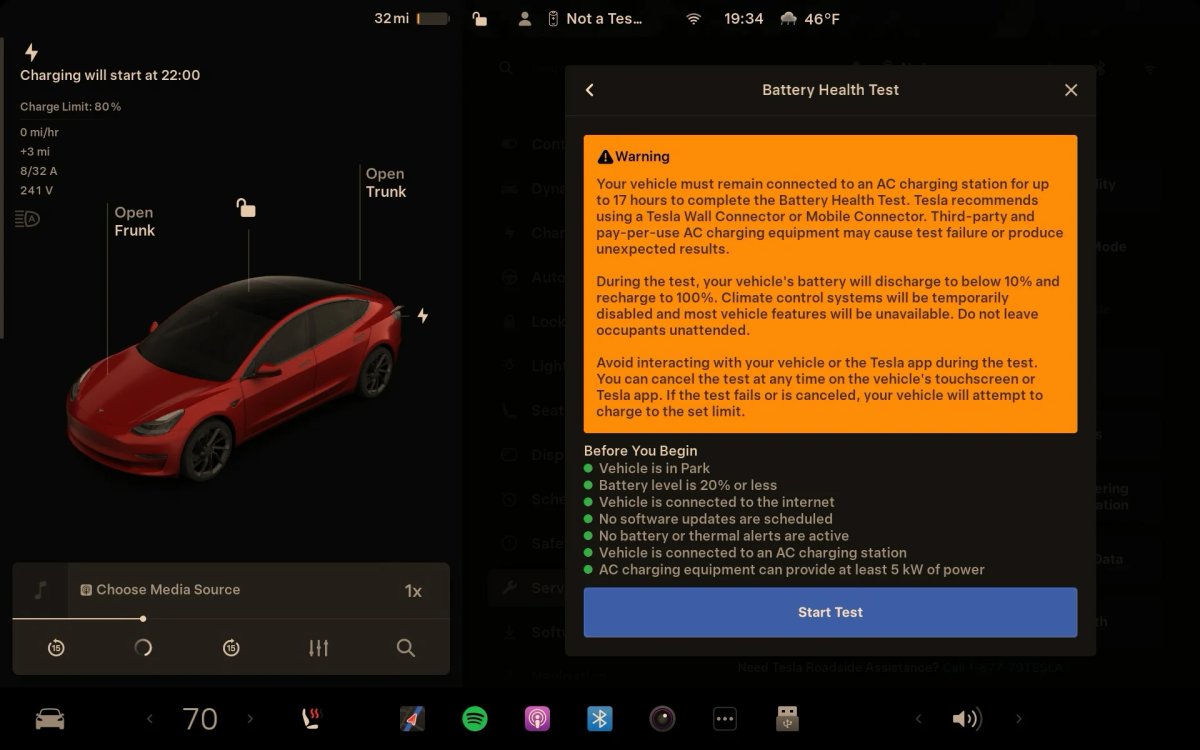
Service Mode Health Test
For professional-grade data without visiting a service center, Tesla’s built-in Service Mode provides the most accurate battery health assessment available to owners.
Activating Service Mode
To run this comprehensive test:
1. Charge your battery below 30% (best results when closer to empty)
2. Plug into your home charger (never use a Supercharger)
3. Access Service Mode through your vehicle touchscreen
4. Navigate to High Voltage > HV Battery > Health Test
Test Duration Expectations
The Health Test requires patience as your vehicle charges to 100%:
– Standard Range models: 12-24 hours
– Long Range variants: 24-48+ hours
– Performance models: May extend to 72 hours with slower charging setups
Never interrupt this process once started, as it unnecessarily increases charge cycles. The vehicle must reach 100% for accurate results—the percentage displayed afterward compares current capacity to original factory specifications.
Interpreting Service Mode Data
Tesla considers these health ranges:
– Above 90%: Within normal parameters for vehicle age
– 85-89%: Acceptable degradation for mileage
– 80-84%: Monitor closely for acceleration
– Below 80%: Potential warranty claim territory
This method is the gold standard for checking Tesla battery health but should be used sparingly—once every 6-12 months is sufficient for most owners.
Third-Party Diagnostic Apps
When Tesla’s native tools don’t provide enough detail, these apps deliver deeper battery insights with varying technical requirements.
Recurrent Battery Reports
Recurrent offers free U.S.-based monitoring that tracks capacity weekly after a 7-day baseline period. The service compares your vehicle’s performance to identical models in similar conditions without requiring Service Mode access. Data updates automatically through real-world driving patterns, making it ideal for passive monitoring.
Scan My Tesla Features
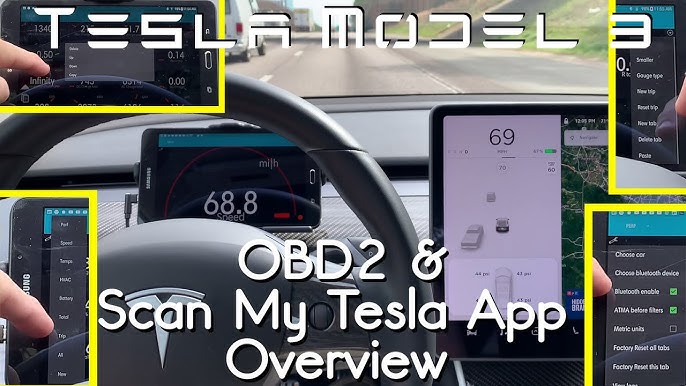
This advanced tool connects via OBD-II adapter ($30-50) to reveal precise metrics:
– Exact kilowatt-hours (kWh) of remaining capacity
– Individual battery module temperatures
– Historical degradation trends
– Real-time state of health percentage
Important: Requires technical knowledge to interpret data correctly. Misreading these metrics could cause unnecessary concern about normal battery behavior.
Tessie App Monitoring
Tessie automatically tracks battery health after substantial charges using this calculation: Current kWh ÷ Original kWh. The app counts charging cycles (where 0-100% equals one full cycle) and sends customizable alerts when health drops below your specified threshold—perfect for setting maintenance reminders.
Physical Range Verification Method

The simplest method for checking Tesla battery health compares actual driving range to original EPA ratings—a technique that works even without technical tools.
Step-by-Step Range Check
- Charge to 100% at home (Superchargers reduce accuracy)
- Switch display to miles: Controls > Display > Energy > Distance
- Record the number shown at full charge
- Compare to EPA rating for your specific model year
Quick Reference Table
| Model | Original EPA Range | 90% Health | 85% Health | 80% Health |
|---|---|---|---|---|
| 2021 Model 3 LR | 353 miles | 318 miles | 300 miles | 282 miles |
| 2021 Model Y LR | 326 miles | 293 miles | 277 miles | 261 miles |
| 2022 Model S | 405 miles | 365 miles | 344 miles | 324 miles |
Calculation example: Your 2021 Model Y shows 300 miles at 100% charge. Original EPA rating is 326 miles. 300 ÷ 326 = 92% battery health—well within normal parameters for a used vehicle.
Used Tesla Pre-Purchase Assessment
Buying a used Tesla requires battery verification before purchase. These methods work even without vehicle ownership.
Range Score Tools
Major platforms now include battery health scores:
– Cars.com: Displays 0-100 range score (can exceed 100 for better-than-expected performance)
– CarMax: Provides battery health percentage
– Edmunds: Shows estimated range vs. original
Interpretation guide:
– 95-100: Better than expected for age/mileage
– 90-94: Normal degradation
– 85-89: Consider negotiating price
– Below 85: Request professional inspection
Professional Evaluation Checklist
EV-specialized dealers verify:
– State of health percentage through Service Mode
– Original vs. current capacity comparison
– Battery replacement history documentation
– Software update status affecting battery management
– Charging system integrity during test drives
Warranty Coverage Guidelines
Tesla’s battery warranty protects against excessive degradation. Know your coverage before paying for diagnostics.
Warranty Thresholds by Model
- Model S/X: 8 years/150,000 miles, minimum 70% capacity
- Model 3/Y LR & Performance: 8 years/120,000 miles, 70% minimum
- Model 3/Y Standard Range: 8 years/100,000 miles, 70% minimum
File a warranty claim when health drops below 70% within the coverage period or when sudden range decreases occur without explanation. Most Teslas retain 85-95% capacity after 150,000+ miles, making battery replacement rare before 200,000 miles.
Maintenance for Optimal Health
Proactive care maintains accuracy in how to check Tesla battery health readings and extends battery lifespan.
Daily Best Practices
Charging Guidelines:
– Standard batteries: Keep between 40-80% for daily use
– LFP batteries: Can safely charge to 100% regularly
– Long trips: Charge to 100% only when needed
– Storage: Maintain 50-60% charge for extended parking
Calibration Techniques
Recalibrate monthly for accurate range calculations:
1. Drive until battery reaches 10-20%
2. Charge uninterrupted to 100%
3. Leave plugged in for 2+ hours after reaching 100%
4. This resets the battery management system’s estimates
Final Verdict: Knowing how to check Tesla battery health empowers you to monitor your vehicle’s condition accurately. Use the app for quick monthly checks, Service Mode for detailed annual assessments, and third-party apps for continuous monitoring. Most Teslas retain 85-95% of original capacity well beyond warranty periods—meaning significant degradation is rare before 150,000 miles. For used car buyers, battery health checks provide crucial negotiation leverage, while current owners gain peace of mind through proactive monitoring. Implement these methods consistently, and you’ll maintain accurate battery health awareness without unnecessary service visits or replacement concerns.


