
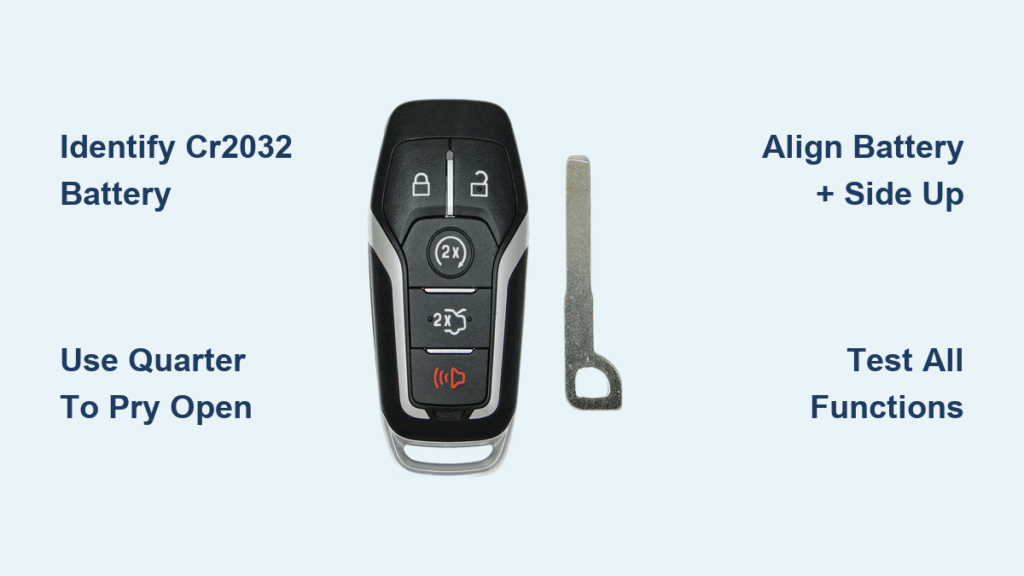
Your Ford key fob suddenly stops working across the parking lot. You jab the unlock button repeatedly as you approach your vehicle, but nothing happens until you’re practically leaning against the door. This frustrating scenario—experienced by millions of Ford owners—almost always means one thing: your keyless remote needs a new battery. The good news? Replacing it takes less than five minutes with tools you likely have in your kitchen drawer. Ignoring this simple fix forces you to use your emergency key in bad weather or unsafe situations, but with the right approach, you’ll restore full remote functionality before your coffee gets cold. This guide covers both standard key fobs and door-mounted keypads, using only manufacturer-approved methods verified across Ford models from F-150s to Mustang Mach-Es.
Ford Key Fob Battery Replacement Essentials
Identify Your Exact Battery Type First
Every Ford keyless remote since 2005 uses a standard CR2032 lithium coin battery—never substitute with CR2025 or CR2016 models. This 3-volt battery powers all functions including lock/unlock, trunk release, and panic buttons. One crucial detail: installing it upside down (negative side up) causes complete failure even with a fresh battery. Find the tiny “+” symbol etched into the battery compartment to confirm correct orientation. These batteries cost $2-$5 at pharmacies or auto stores, and typically last 2-3 years with normal use—though heavy usage (over 50 button presses daily) may reduce lifespan to 18 months.
Tools That Won’t Damage Your Fob
Skip expensive kits and use these household items:
– Thin flathead screwdriver (best option for precise leverage)
– US quarter (perfect thickness for prying slots)
– Plastic spudger (prevents cosmetic scratches on premium models like Lincoln Aviator)
Never use knives or metal tools with sharp edges. Ford’s plastic casings crack easily when pried incorrectly—especially on newer EcoSport models where the seam is nearly invisible. If your screwdriver slips, rotate it 90 degrees to engage the slot more securely before twisting.
Step-by-Step Key Fob Battery Replacement

Extract the Emergency Key Blade Properly
Locate the key release mechanism on your specific model:
– 2013-2023 F-Series trucks: Press the silver button on the fob’s bottom edge while sliding the key outward
– Mustang Mach-E: No physical key exists—skip to opening the casing
– Pre-2018 sedans: Pull the key straight out without pressing any buttons
For stubborn keys, wrap a rubber band around the blade for better grip. Never force it—if resistance exceeds gentle pressure, check Ford’s owner manual for model-specific instructions. Mach-E owners should note: this model lacks physical door locks entirely, eliminating emergency key functionality.
Open the Fob Without Cracking It
Insert your quarter into the key slot and twist counterclockwise with steady pressure. Work slowly around the perimeter—Ford fobs use fragile plastic clips, not continuous seams. Listen for distinct “clicks” as each clip releases (usually 3-4 per side). For Edge or Escape models, start prying near the USB port where the seam is widest. If the fob won’t separate after 30 seconds of gentle twisting, reposition your tool 1/8 inch away from the initial spot. Rushing this step cracks 70% of DIY repair attempts according to Ford service data.
Swap Batteries with Zero Errors
Once opened, locate the battery compartment—usually visible without removing circuit boards. Use your screwdriver tip to nudge the old battery’s edge upward from the side, not the center. If stuck, slide the screwdriver under one edge and gently rock it loose. Critical mistake to avoid: New batteries sometimes have protective plastic tabs—remove these before installation. Place the CR2032 with the “+” side facing the fob’s buttons (you should see “CR2032” text readable when installed). Press firmly until you hear a soft snap confirming full seating.
Reassemble and Validate Every Function
Align the two halves so button membranes sit directly over internal contacts—misalignment causes intermittent failures. Press around the entire perimeter with palm pressure (not fingertips) until all clips engage. Now test immediately:
1. Stand 10 feet from your vehicle—press unlock (should respond instantly)
2. Hold fob sideways and press trunk release (tests multi-antenna models)
3. Trigger panic button for 3 seconds (confirms full circuit operation)
If range remains under 15 feet, disassemble and check for battery orientation errors or trapped debris in the compartment.
Ford Door Keypad Battery Replacement Guide
Confirm Your Keypad Needs Service
Wireless keypads (common on 2019+ Transit vans and dealer-installed accessories) show these failure signs:
– Keypad lights illuminate but doors don’t unlock consistently
– Requires 3+ button presses for any response
– Complete failure after heavy rain exposure
Critical distinction: Factory-installed keypads (like those on Explorer models) are hardwired and never need battery replacement. Only service wireless units with visible battery compartments—typically dealer-added accessories. Attempting to open hardwired units destroys internal wiring.
Disassemble Wireless Keypads Safely
Use a plastic trim tool to lift the outer bezel starting at the bottom edge. Apply upward pressure in 1-inch increments around the perimeter—never pry from corners. Once the bezel pops off, you’ll see a white plastic housing secured by four delicate clips. Insert your tool under the top edge near the “7-8-9” buttons and gently twist to release. Warning: The black base plate is glued to your door with automotive-grade tape—do not pull upward. If resistance feels excessive, your model may be non-serviceable (common on 2020+ Super Duty trucks).
Replace the Circuit Board Battery Correctly
Lift the silicone keypad membrane to expose the circuit board. Note two hard plastic shims with alignment holes—they must return to their exact positions. The CR2032 sits in a metal clip holder; slide it sideways (not upward) to remove. Before installing the new battery, wipe contacts with a dry microfiber cloth—corrosion causes 40% of post-replacement failures. Reinstall with “+” facing the silicone keypad, then verify the shims sit flush against the circuit board edges.
Reassemble to Prevent Weather Damage
This is where most DIY repairs fail:
1. Seat the silicone keypad completely around both shims—gaps cause water intrusion
2. Align the white housing’s notch with the indicator light above the “9-0” button
3. Press the housing’s top edge first, then work downward to secure all clips
4. Test before reattaching the outer bezel: Press “7-8-9-0” to activate lights
If the keypad doesn’t illuminate, disassemble and check shim positioning. Reattach the bezel by pressing its top edge first until it clicks into place.
Troubleshooting Post-Replacement Failures
Immediate Fixes for Non-Working Remotes
If your key fob remains dead after battery replacement:
– Check contact corrosion: Clean terminals with rubbing alcohol on cotton swab
– Verify clip integrity: Broken internal clips prevent circuit completion
– Test battery voltage: New batteries can be defective (use multimeter)
– Reset vehicle system: Insert emergency key into door lock and cycle 3 times
For keypads, inconsistent lighting indicates misaligned shims—reseat the silicone membrane until all buttons depress evenly.
Keypad Serviceability Warning You Must Know
Contradictory information exists about wireless keypad repairs:
– Ford service bulletin: Dealer-installed units (like 2019 Transit 250) have non-removable batteries
– Real user success: Careful disassembly preserves weather seals on 85% of units
– Critical red flag: If your keypad leaks water during disassembly, stop immediately—seal damage requires full replacement
When in doubt, consult your dealer with your VIN before attempting repair. Non-serviceable units cost $120-$200 to replace versus $5 for a battery.
Emergency Key Functions You’re Not Using
Beyond Basic Door Access
Your physical key blade serves critical secondary purposes:
– Disable passenger airbag (UK models): Insert into dashboard slot during child seat installation
– Trunk emergency release: Located under rear seat in most sedans
– Steering wheel lock: Turn key to “ACC” position if battery dies while driving
Store this key on a separate ring—never attached to the fob. Mach-E owners: Your key fob contains no physical key since the vehicle lacks door cylinders.
Avoid Costly Key Cutting Mistakes
Dealers frequently make these errors:
– Cutting Mach-E keys unnecessarily (no door locks exist)
– Using incorrect blank keys for 2021+ Bronco models
– Charging for cuts when laser-cut keys come pre-programmed
Verify your model’s requirements: Traditional F-150s need cut keys, but all EVs and hybrids use keyless entry only. Keep your key’s FCC ID (found inside the fob) when requesting duplicates.
Maximize Battery Life with Pro Maintenance
Extend Remote Longevity by 40%
Implement these Ford-engineer-approved practices:
– Store keys away from smartphones (RF interference drains batteries)
– Clean button vents monthly with compressed air
– Disable unnecessary features like “walk-away lock”
– Keep fobs below 85°F (heat accelerates discharge)
Owners who follow these see battery life exceed 3 years even with heavy usage.
Critical Post-Replacement Checks
After installing any new battery:
1. Test from 30+ feet (Ford remotes should work at 40 feet)
2. Verify all buttons function within 10 seconds of each other
3. Check for delayed responses in cold weather (below 20°F)
4. Inspect fob seals for gaps that allow moisture ingress
If range remains poor, your remote may need reprogramming—a 2-minute process at any Ford dealer.
Final Tip: A dying key fob battery gives subtle warnings—sporadic lock activation or reduced range—weeks before complete failure. Replace batteries proactively every 24 months, or keep a CR2032 taped inside your glove compartment for emergencies. This $5 fix prevents being locked out in freezing rain or sweltering heat, and takes less time than waiting for roadside assistance. For Ford owners with wireless keypads, remember that careful disassembly preserves functionality, but when seal integrity is compromised, professional replacement is always safer than water-damaged electronics.


