
Your Tesla feels sluggish on a freezing morning—regenerative braking barely works, charging speeds crawl to a halt, and your range display drops 20% before you even leave the driveway. This frustrating scenario happens to thousands of Tesla owners every winter, but there’s a simple solution hiding in plain sight: battery preconditioning. When you know how to precondition Tesla battery properly, you’ll unlock faster charging, restored regenerative braking, and up to 20% more range in cold conditions.
This guide reveals exactly when and how to precondition your Tesla battery using every available method—no technical expertise needed. You’ll discover why preconditioning matters, which techniques actually work (and which waste energy), and the insider tricks that veteran Tesla owners use to maximize winter performance. Whether you’re heading to work or embarking on a road trip, these proven methods will transform your cold-weather driving experience.
Why Your Tesla Battery Needs Preconditioning Below 50°F
Cold temperatures cripple lithium-ion battery performance—your Tesla’s NCA or NCM cells react sluggishly when chilled, reducing power output and charging speed. At 32°F, your battery operates at just 50-60% of its normal capacity, explaining why regenerative braking disappears and Supercharger speeds plummet. Preconditioning solves this by warming cells to their sweet spot (40-80°F), restoring full functionality.
Your Tesla’s Battery Management System handles basic temperature regulation automatically, but manual preconditioning gives you control over timing and intensity. This is crucial when you need maximum performance immediately—like when heading to a Supercharger or tackling a long commute. Without preconditioning, you’re essentially driving with the parking brake on, wasting energy and sacrificing range.
How Cold Weather Affects Key Tesla Systems
Regenerative braking failure: Below 40°F, your Tesla may limit or disable regenerative braking entirely, forcing you to use friction brakes more often. This creates an inconsistent driving feel and reduces energy recapture.
Supercharger speed reduction: A cold battery at 20% charge might accept only 50kW instead of the advertised 250kW—tripling your charging time. Preconditioning brings the battery to optimal temperature for maximum charging rates.
Range loss: Cold batteries deliver less total energy, causing up to 40% range reduction in extreme conditions. Preconditioning while plugged in preserves your starting range by using grid power instead of battery reserves.
Activate Scheduled Departure for Hands-Off Preconditioning

Set this feature once and forget it for daily commutes—your Tesla automatically preconditions while plugged into home charging, using grid power instead of your battery. This is the most energy-efficient method for predictable routines.
Step-by-Step Setup Process
- Tap Controls → Charging on your Tesla touchscreen
- Select Scheduled Departure and set your typical weekday departure time
- Toggle Precondition to “On” (critical step many owners miss)
- Repeat for weekend schedules if different
Your Tesla calculates outside temperature and begins preconditioning 30-60 minutes before departure. For best results, use Level 2 charging at home—this draws sufficient power for effective battery warming without draining your pack. Pro owners set two schedules: one for workdays and another for weekend adventures.
Warning: Scheduled departure won’t activate if your battery drops below 20% overnight. Always maintain at least 30% charge during cold snaps.
Use Tesla App for Instant Battery Warming Before Errands
Need immediate preconditioning for an unexpected trip? The Tesla app delivers remote battery warming from anywhere—perfect when you’re finishing breakfast before heading out.
Exact App Activation Steps
- Launch the Tesla app and select your vehicle
- Tap the Climate icon (snowflake/sun symbol)
- Set cabin temperature to 72°F or higher
- Ensure the charging cable is connected (vital for grid-powered warming)
- Tap Start and wait 30-45 minutes for full effect
This method shines when you have time to prepare—start preconditioning while packing your bag or making coffee. Within 30 minutes, your battery reaches optimal temperature, restoring full regenerative braking and maximizing range. Never use this method unplugged; it typically consumes 3-6 miles of range just for preconditioning.
Pro tip: Combine app preconditioning with cabin heating for dual benefits—your battery warms while your seats and steering wheel heat up, creating instant comfort upon entry.
Maximize Supercharger Speeds With Navigation-Based Preconditioning
Road trips demand strategic preconditioning—navigate to any Supercharger using Tesla’s built-in system, and your vehicle automatically preconditions during the final 30-45 minutes of your drive.
Why This Method Beats Manual Preconditioning
When you enter a Supercharger destination, your Tesla activates thermal management at precisely the right moment—no guesswork required. The system calculates based on:
– Current battery temperature
– Outside ambient temperature
– Distance to Supercharger
– Estimated arrival time
For maximum charging speeds, arrive with ≤30% battery remaining. Counterintuitively, a 10% battery often charges faster than a 50% battery due to thermal dynamics. During a 200-mile drive to a Supercharger, preconditioning typically starts around mile 170, ensuring you hit peak charging rates immediately upon arrival.
Critical mistake to avoid: Using third-party navigation apps. Only Tesla’s native navigation triggers automatic Supercharger preconditioning—Waze or Google Maps won’t activate this feature.
Decode Your Tesla’s Preconditioning Status Indicators
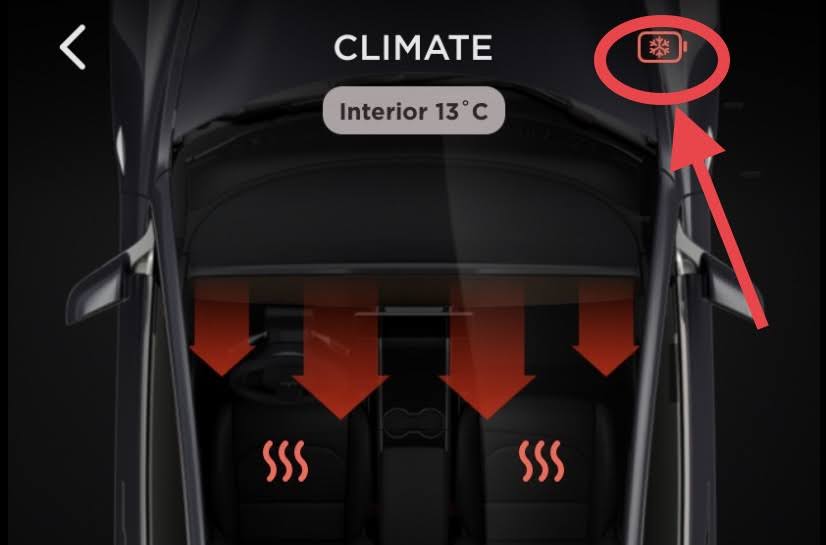
Your vehicle communicates battery temperature status through subtle but critical visual cues—knowing these symbols prevents confusion during cold weather operation.
Essential Dashboard Symbols Explained
Blue snowflake icon: Battery too cold for optimal performance—preconditioning recommended. This appears when regenerative braking is limited.
Three vertical orange lines: Battery actively warming (resembles “sizzling bacon”). These appear below the battery icon when preconditioning is in progress.
Yellow dotted regen line: Indicates reduced regenerative braking due to cold temperatures—full regen returns as battery warms.
Defrost icon secret: Activating defrost triggers comprehensive warming—including battery, charge port, cameras, and steering wheel—making it more effective than standard climate control.
Fix Slow Supercharger Rates With These Preconditioning Tactics

Arriving at a Supercharger only to see charging speeds stuck at 50kW instead of 250kW? These troubleshooting steps solve most cold-weather charging issues.
Immediate Fixes for Low Charging Speeds
Check preconditioning time: You need at least 30 minutes of active warming. If you preconditioned for only 10-15 minutes, drive 5-10 more miles—the battery continues warming during driving.
Verify battery level: Arrive with 20-30% charge for optimal speeds. Batteries charge fastest when partially depleted, not empty or half-full.
Confirm visual indicators: Three orange lines should appear below the battery icon during preconditioning. No orange lines means your battery isn’t warming properly.
Critical tip: Never precondition while already connected to a Supercharger—this wastes valuable charging time. Always precondition during your drive or while parked nearby.
When You Actually Don’t Need to Precondition Your Tesla
Preconditioning isn’t always necessary—using it unnecessarily wastes energy and time. Save your efforts for these high-impact scenarios only.
Strategic Times to Skip Preconditioning
- Temperatures above 60°F: Battery operates near peak efficiency without intervention
- Trips under 10 miles: Energy used for preconditioning often exceeds gains
- Garage-parked vehicles: Starting temperature is 15-20°F higher than outside
- Level 2 charging sessions: Slower charging rates are less affected by temperature
Many experienced Tesla owners precondition just 4-5 times per year—typically for road trips or extreme cold snaps below 20°F. Tesla’s automatic battery management prevents damage regardless of your preconditioning choices, so don’t stress over perfection.
Optimize Winter Range With These Pro Preconditioning Hacks
Veteran Tesla owners combine preconditioning with these advanced techniques for maximum cold-weather efficiency.
Range-Boosting Strategies
Tire pressure maintenance: Cold temperatures reduce tire pressure 1-2 PSI per 10°F drop. Underinflated tires compound winter range loss—check pressure weekly.
Regenerative braking setting: Enable “Apply brakes when regen limited” in Pedals & Steering settings for consistent deceleration feel during warm-up.
Garage parking advantage: Park indoors when possible—reduces preconditioning time by 50% and preserves starting range.
Energy tracking: Monitor kWh/mile in cold conditions—you should see 21% energy savings with proper preconditioning versus non-preconditioned driving.
Final Preconditioning Strategy for Daily Tesla Owners
Master Tesla battery preconditioning by matching methods to your specific needs: Use Scheduled Departure for daily commutes, the Tesla app for random trips, and navigation-based preconditioning for Supercharger visits. Always precondition while plugged in when possible—this preserves range by using grid power instead of your battery.
Remember that preconditioning optimizes performance but isn’t required for battery protection. Start with Scheduled Departure for your work commute, then experiment with other methods as needed. Within one cold snap, you’ll notice the difference—smoother regenerative braking, faster charging, and that satisfying feeling of maximum range restored, even when temperatures plummet below freezing. Your Tesla was engineered for winter performance; preconditioning simply unlocks what’s already there.


