
Your Kia just got a fresh battery or needed a disconnect for service, and now things aren’t working quite right. The windows won’t auto-roll, your favorite radio stations vanished, and the sunroof acts confused. Don’t panic—these are normal symptoms when your Kia loses power. Modern vehicles store calibration data in volatile memory that disappears when the battery disconnects, causing multiple systems to reset to factory defaults.
This guide walks you through every reset procedure needed to restore full functionality. Most fixes take under 5 minutes each, and you’ll save a trip to the dealer by handling these resets yourself. Understanding how to reset Kia after battery disconnection properly ensures all safety features function correctly and restores your personalized settings.
Why Your Kia Systems Fail After Battery Disconnection
Modern Kia vehicles rely on electronic control modules that store calibration data in volatile memory. When battery power is completely removed, this stored information vanishes, requiring systems to relearn or be manually reset. This isn’t a malfunction—it’s by design for electrical safety during maintenance. Critical systems like window auto-up/down lose their position memory, disabling the anti-pinch protection that prevents injuries.
The trip computer resets all accumulated data, while climate control systems forget temperature calibrations. Even convenience features like radio presets and seat memory get wiped. Knowing exactly how to reset Kia after battery disconnection prevents unnecessary service visits and restores full vehicle functionality in under 30 minutes.
Window Auto Reset Procedure for Safety Restoration
Fix Power Window Calibration Immediately
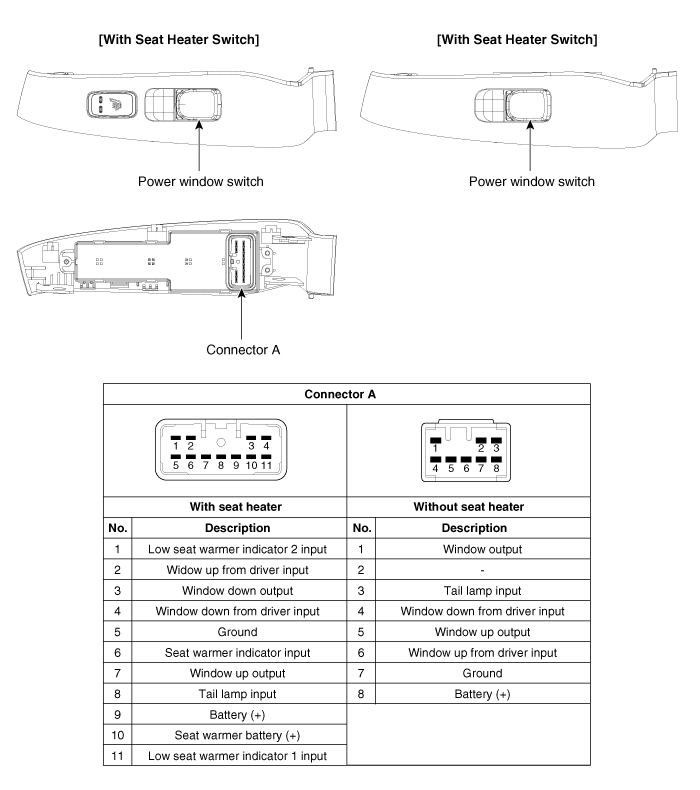
Your Kia’s windows forget their position when power is lost. Without reset, the auto up/down feature stops working and anti-pinch protection disables—creating safety risks. This is the most critical reset to perform first after reconnecting your battery.
For each window:
1. Start engine and close all doors
2. Hold window switch down for 2 seconds after window fully opens
3. Pull switch up and hold for 2 seconds after window fully closes
4. Test auto feature – one-touch should now work
Pro tip: Complete this sequence for every window, including rear ones. The driver’s master switch won’t calibrate passenger windows automatically. Listen for a slight click when holding the switch past the fully open or closed position—this confirms successful calibration.
When Windows Still Won’t Auto
- Check child locks – rear windows need individual switch access
- Repeat sequence twice if first attempt fails
- Listen for clicks – you’ll hear faint motor sounds during successful calibration
- Verify door switches – ensure doors are fully closed during reset
Warning: Never operate windows without completing this reset. The anti-pinch safety feature won’t function properly, risking injury or damage.
Sunroof Initialization Steps for Proper Operation
Restore Sunroof Memory Completely
A disconnected battery scrambles sunroof position data. Your sunroof may move slowly or stop mid-travel without proper initialization, potentially causing water leaks or mechanical strain.
Quick sunroof reset:
1. Turn ignition to ON (engine off is fine)
2. Press and hold CLOSE for 10 seconds past closed position
3. Release and immediately press VENT until fully vented
4. Hold VENT button for 5 additional seconds
5. Test one-touch operation in both directions
Warning signs: Grinding noises or jerky movement indicate incomplete initialization—repeat steps once more. If the sunroof still operates erratically after two attempts, stop and consult your dealer, as some 2019+ models require diagnostic tool initialization.
Trip Computer Data Recovery Process
Reset Trip Information Systems Correctly
Your fuel economy data, trip timers, and distance calculations reset to factory defaults. This isn’t broken—it’s normal after power loss. The system needs to relearn your driving patterns to provide accurate information.
What you’ll need to reconfigure:
– Trip A and B odometers – press TRIP button to cycle and reset
– Average fuel consumption – drives 5-10 miles for accurate readings
– Distance to empty – requires 1/4 tank minimum for calculation
– Trip timer – manually reset through vehicle settings menu
Pro tip: The system relearns your driving patterns over 50-100 miles. Expect initially optimistic fuel economy estimates during this period. For accurate long-term tracking, reset Trip A before beginning a regular commute pattern.
Climate Control Recalibration for Comfort Restoration

Restore Temperature Settings Efficiently
Your automatic climate control forgets temperature preferences and calibration data. The system may blow too hot or cold initially as it relearns cabin conditions without its previous reference points.
Simple recalibration method:
1. Start engine and let idle
2. Set temperature to 72°F (middle setting)
3. Turn system OFF for 30 seconds
4. Turn ON and switch to AUTO
5. Adjust to preferred temperature – system now relearns
Signs of success: Consistent temperature output within 2-3 minutes of adjustment. If airflow remains uneven after recalibration, check cabin air filter condition—this is often overlooked during battery service.
Radio and Infotainment Reset Solutions
Reprogram Convenience Features Quickly
While not safety-critical, these resets restore your daily comfort settings and prevent frustration during your next drive.
Quick radio station restore:
– FM/AM presets – hold desired preset button for 2 seconds while tuned
– SiriusXM channels – call to reactivate if subscription lapsed
– Audio settings – bass/treble typically reset to neutral
Bluetooth reconnection process:
1. Delete old Kia pairing from your phone
2. Enter Kia menu → Phone → Add New Device
3. Enable phone pairing mode
4. Confirm PIN matches on both devices
Clock adjustment: Hold CLOCK button for 3 seconds, use tuning knob to set time. Consider syncing to your phone’s time for automatic updates.
Advanced System Considerations for Newer Models

When Dealer Service Is Required
Certain newer Kia models (2015+) store calibration data in modules that need professional reset tools. These symptoms indicate dealer visit needed:
- Steering feels heavy or off-center
- Transmission shifts harshly for first few drives
- Advanced safety systems (lane keep, smart cruise) show errors
- TPMS light stays on despite correct tire pressures
What you can do first: Drive 10-15 miles normally. Many systems self-calibrate during this period. If warning lights persist after this test drive, schedule dealer service for proper diagnostic initialization.
Memory Seat and Homelink Reset Procedures
Power seat memory:
1. Adjust seat to preferred position
2. Press SET button until beep
3. Press memory button 1 or 2 within 5 seconds
Homelink garage door programming:
– Hold desired button until LED flashes rapidly
– Point garage remote 1-3 inches away
– Press and hold remote button while Homelink button is pressed
– Release both when Homelink LED changes (typically solid)
– Test operation from inside vehicle
Post-Reset Verification Checklist
Confirm Full System Functionality
After completing resets, test each feature before considering the job done:
- Windows: Test auto up/down on all switches from driver and passenger positions
- Sunroof: Check one-touch open/close and vent positions at multiple speeds
- Climate: Verify temperature responds correctly after 5 minutes of operation
- Radio: Confirm all presets and Bluetooth connection stability
- Clock: Verify correct time display and automatic daylight saving adjustment
Critical check: Roll each window completely up and test anti-pinch function by placing a soft object (like a rolled towel) in the window path. The window should reverse direction immediately.
Prevention Strategies for Future Battery Work
Avoid Reset Hassles Next Time
- Use memory saver device during future battery work (12V power source connected to cigarette lighter)
- Take photos of radio presets and seat positions before disconnect
- Write down Homelink programming sequence and garage door codes
- Keep owner’s manual handy in glovebox for quick reference
Pro tip: When replacing your battery, connect the new battery before disconnecting the old one. This maintains power to the vehicle’s computer systems and prevents most resets from being necessary.
Final note: Completing these steps properly ensures you know how to reset Kia after battery disconnection completely and safely. Most systems should function normally within 20-30 minutes of completing these procedures. If critical warning lights remain illuminated or safety systems (like automatic emergency braking) show errors after following these steps and driving 15 miles, visit your Kia dealer for diagnostic initialization—some 2020+ models require specialized equipment for complete system calibration after battery disconnection. Keep this guide in your glove compartment for quick reference during future battery service.


