Your Tesla’s range indicator suddenly drops 40 miles overnight. The battery shows 75% charge, but you’re straining to reach your usual destinations. This frustrating discrepancy isn’t random—it happens when your Battery Management System (BMS) loses calibration. As Tesla owners know too well, inaccurate range calculations create real anxiety on the road. The solution? A precise battery calibration process that resets your BMS to factory accuracy. This guide delivers the exact steps to fix range miscalculations yourself, eliminating unnecessary service visits and restoring confidence in your daily drives.
Unlike conventional cars, Tesla’s sophisticated Battery Management System constantly calculates range, battery level, and capacity based on complex cell voltage measurements. Over time, minor imbalances develop between individual battery cells, causing the BMS to drift from actual performance metrics. This calibration guide addresses the root cause of range inaccuracies using Tesla’s recommended method—no special tools or technical expertise required. You’ll complete the entire process using your standard charging setup while learning why each step matters for long-term battery health.
Why Tesla Battery Calibration Solves Range Inaccuracies
Tesla’s Battery Management System serves as your vehicle’s central computational brain for all battery-related metrics. It continuously monitors thousands of data points across the battery pack to calculate your remaining range, charge level, and overall capacity. When cell voltages shift over extended use, these calculations become progressively inaccurate—a natural phenomenon in all lithium-ion battery systems. Calibration resets the BMS by establishing new baseline measurements at critical charge thresholds.
Without proper calibration, your Tesla operates with flawed data that directly impacts driving decisions. You might avoid necessary trips due to underestimated range or risk being stranded with overestimated projections. This isn’t a battery defect but rather expected behavior in any advanced electric vehicle system. The good news? Recalibration restores precision by realigning the BMS with your battery’s current physical state, often resolving what appears to be significant degradation.
Clear Signs Your Tesla Needs Battery Calibration
Inconsistent Range Calculations
Your vehicle suddenly displays significantly lower range than historical patterns. For example, a Model 3 that consistently showed 260 miles at 85% charge now indicates only 220 miles under identical conditions. These deviations exceed normal temperature-related fluctuations and persist across multiple charging cycles.
Battery Level vs. Performance Mismatch
The displayed charge percentage doesn’t match real-world driving behavior. You might observe power limitations or reduced acceleration at 60% charge—conditions that previously only occurred below 20%. This disconnect between the instrument cluster and actual performance signals BMS miscalibration.
Capacity Estimation Errors
Maximum range projections fall substantially below your vehicle’s established baseline. A Model Y that previously calculated 300 miles of maximum range now caps at 250 miles despite unchanged driving habits and conditions. These capacity miscalculations directly impact trip planning reliability.
Charging Completion Discrepancies
Your charging sessions reach 100% faster or slower than usual without environmental explanation. You might notice the range meter jumping erratically during charging, indicating the BMS struggles to correlate charge input with actual capacity.
The Verified Tesla Battery Calibration Procedure
Step 1: Natural Battery Depletion Below 10%
Duration: Complete over normal driving days
Critical Requirement: Reach below 10% charge through regular usage
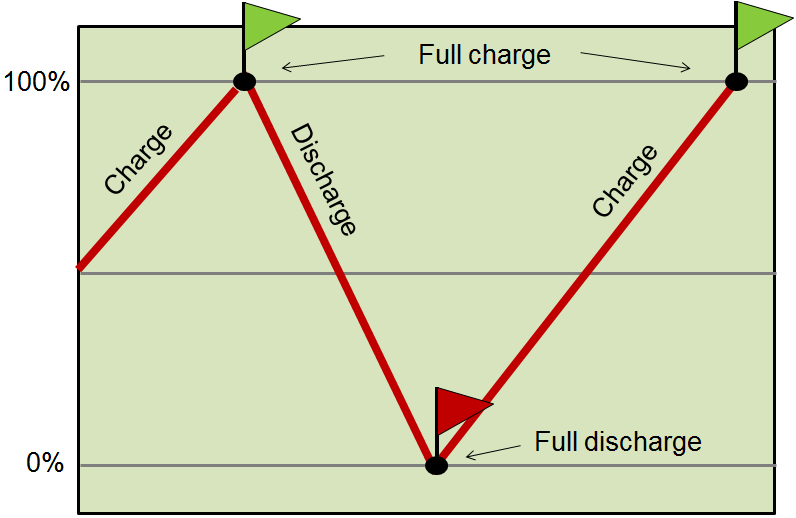
Drive your Tesla as you normally would until the battery meter drops below 10%. Avoid forced depletion methods like leaving accessories running—the BMS requires authentic driving patterns to map cell behavior accurately. Plan this phase carefully: start when you have sufficient charge for essential trips, and monitor levels closely to prevent complete discharge.
What to watch for:
– The vehicle will display “Low Battery” warnings around 15%
– Regenerative braking reduces as you approach 10%
– Climate control may limit power to preserve essential functions
Pro Tip: Charge to 20-30% if you must complete essential trips, but return to depletion phase immediately after. Partial recharging resets the calibration process.
Step 2: Mandatory One-Hour Rest at Low Charge
Duration: Exactly 60 minutes
Critical Timing: Begin immediately after reaching below 10%
Once below 10%, park your Tesla and leave it completely undisturbed for one full hour. During this rest period, the Battery Management System performs critical diagnostics:
– Measures individual cell voltages at the low-charge threshold
– Identifies imbalances between parallel cell groups
– Establishes baseline reference points for recalibration
Location Requirements:
– Park in a safe, accessible location near charging
– Ensure cellular connectivity for system diagnostics
– Avoid extreme temperatures if possible (though not required by procedure)
Warning: Opening doors, activating climate control, or using touchscreen during this phase invalidates the calibration. Set a timer and resist the urge to check progress.
Step 3: Complete Charge Cycle with Extended Top-Off
Duration: 8-12 hours total (varies by model)
Critical Phase: Continuous charging through 100% and beyond
Immediately after the rest period:
1. Connect your Tesla to a standard charging source (Wall Connector, Mobile Connector, or Supercharger)
2. Charge continuously until reaching 100%
3. Crucially: Leave connected for at least one additional hour after 100% is displayed
4. Confirm completion when the charging indicator shows no further energy addition
This extended top-off phase allows the BMS to:
– Balance individual cell voltages across the entire pack
– Finalize new capacity calculations using full-spectrum data
– Update range algorithms with verified maximum capacity
Visual Cue: The charging rate will dramatically slow during the post-100% phase—this indicates active cell balancing. Do not disconnect until the system confirms completion.
Post-Calibration Verification and Results

Within 24 hours of completing calibration, observe these critical improvements:
– Battery level accuracy: Charge percentage consistently matches actual performance
– Range calculations: Projected miles return to historical baselines under similar conditions
– Capacity metrics: Maximum range estimates align with your vehicle’s established capabilities
– Charging behavior: Session durations stabilize to expected timeframes
Track your results over three consecutive charging cycles. True calibration success shows progressive improvement in range prediction accuracy, with full stabilization typically achieved by the third cycle. If discrepancies persist beyond this point, your vehicle may require professional diagnostics.
When to Contact Tesla Support After Calibration
Complete the calibration process exactly as outlined before seeking professional help. However, contact Tesla support if you experience:
– Persistent inaccuracies after two properly executed calibration attempts
– Error messages related to battery performance or charging
– Range deficits exceeding 15% from your vehicle’s original specifications
– Charging interruptions that prevent reaching 100%
For immediate assistance, reach Tesla’s technical team at support@tessie.com. Provide details of your calibration attempts including dates, charge levels, and observed discrepancies. Most cases resolve with additional guidance, but the support team will schedule service if hardware diagnostics are required.
Properly calibrating your Tesla battery eliminates range anxiety by restoring your Battery Management System to factory precision. This simple three-step process—deplete below 10%, rest for one hour, then complete extended charging—resets critical calculations using Tesla’s recommended methodology. Unlike temporary fixes, proper calibration addresses the root cause of inaccurate readings by realigning the BMS with your battery’s actual physical state. Implement this procedure whenever you notice persistent range discrepancies, and you’ll maintain optimal battery performance for years. Remember: accurate range calculations aren’t just convenient—they’re essential for confident daily driving and long-term battery health. By mastering this calibration process, you’ve taken control of your Tesla’s most critical system without stepping foot in a service center.