

Your Acura RDX key fob just died—no response from the locks as you stand in the grocery store parking lot. Before calling roadside assistance or paying $100 at the dealer, know this: replacing your key fob battery takes 5 minutes and costs under $5. This guide walks you through the exact steps for every RDX model year, from 2007 classics to 2023 luxury editions. Whether your key fob suddenly stopped working or you’re noticing reduced range, you’ll have your Acura RDX key battery changed and functioning perfectly before your coffee gets cold.
Identify Your Acura RDX Key Fob Type Immediately
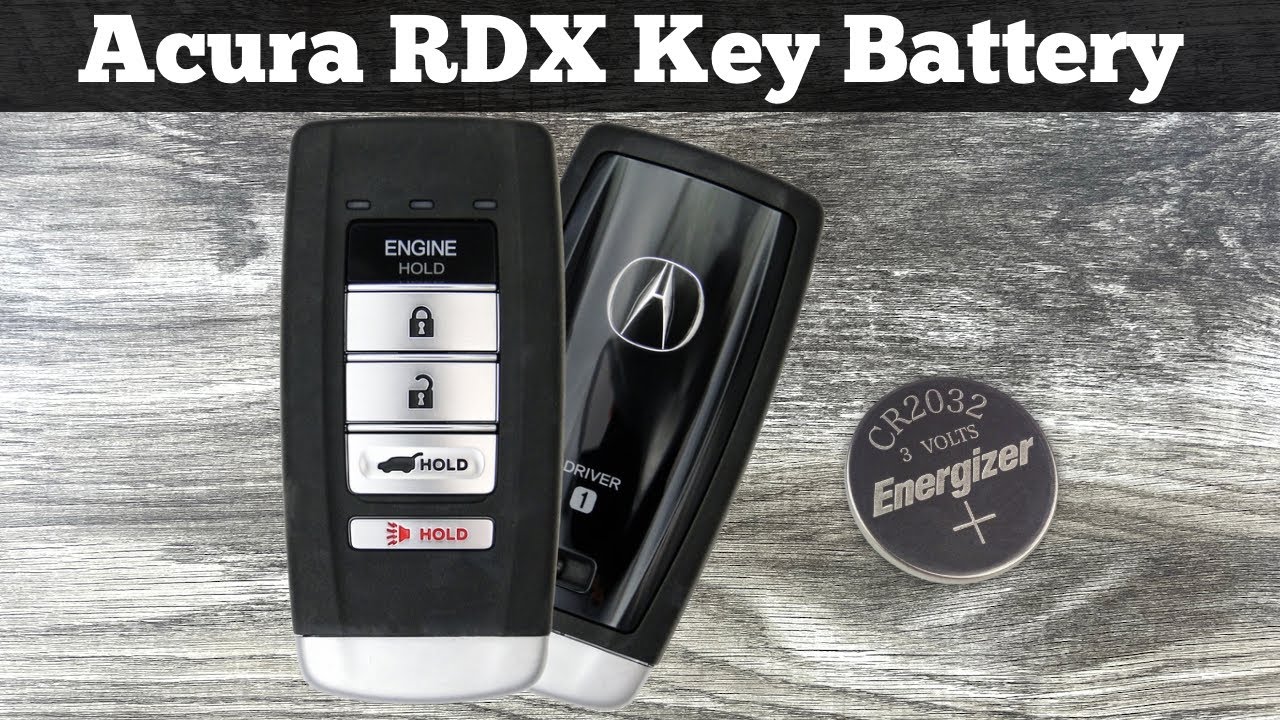
2019-2023 Smart Key Fob Design
The latest RDX uses a sleek smart key with proximity entry. Look for the silver button on the side that releases the physical key blade. This modern design exclusively uses CR2032 batteries hidden inside a snap-together case. Unlike older models, you won’t see any screws—everything clicks together with precision engineering. Check your vehicle’s production date; late 2018 models might still use the older design, so verify before purchasing batteries.
2013-2018 Traditional Remote Configuration
Fourth-generation RDX keys feature traditional buttons on a plastic remote. Flip it over—if you see a sliding cover or small Phillips screw, you’re holding this type. Critical detail: These use either CR2032 or CR2025 batteries depending on the production month, not the model year. Early 2013 models typically use CR2025 while later models switched to CR2032. When in doubt, bring your old battery to the store for visual comparison—these batteries look nearly identical but have different lifespans.
2007-2012 Basic Remote Identification
Early RDX models have the simplest design: a basic plastic remote with visible screw on the back. These always use CR2025 batteries secured by that single screw. The remote feels more substantial in your hand compared to newer models, with larger, more pronounced buttons. If your key fob has a metal loop attachment point rather than the modern keyless entry design, you definitely have this older version.
Gather Exact Tools for Your RDX Key Battery Replacement

Required Tools by Model Year
For all models:
– Correct battery type (CR2032 or CR2025)
– Clean, well-lit workspace
– Small flathead screwdriver or plastic pry tool
Special considerations:
– 2019-2023 models: Use plastic tools to avoid scratching the seamless case
– 2013-2018 models: Precision Phillips screwdriver if your model has screws
– 2007-2012 models: Tiny precision screwdriver for the single back screw
Pro tip: Keep a spare key fob battery in your glove compartment. This $3 investment prevents roadside assistance calls when your primary key dies unexpectedly.
Replace Smart Key Battery in 2019-2023 RDX Models
Release Physical Key Blade Correctly
Press the silver button on your key fob’s side and slide out the metal key completely. Warning: Don’t force it—if resistance feels high, double-check you’re pressing the release button all the way. This reveals the seam you’ll use to open the case. Set the key aside in a safe place; these tiny metal blades disappear easily.
Open Key Fob Case Without Damage
Insert your flathead screwdriver into the seam near where the key was stored. Gently twist—don’t pry—to separate the two halves. Work around the perimeter until the case pops open cleanly. Crucial technique: Apply pressure evenly and move slowly; rushing can crack the plastic housing. If you feel significant resistance, reposition your tool rather than forcing it.
Swap CR2032 Battery Safely
Inside, you’ll see a small metal clip holding the battery. Lift this clip gently with your screwdriver—the old battery will pop up. Note the + side faces up before removing it. Use needle-nose pliers for better grip if needed. Drop in your new CR2032 with the same orientation and press until the clip snaps over it. Critical check: Ensure the battery sits completely flat; uneven placement causes intermittent failures.
Reassemble and Verify Functionality
Align the case halves and press firmly around all edges until you hear clicking. Reinsert the key blade until it clicks. Test every button immediately—lock, unlock, trunk, and panic should all respond with bright LED flashes. Troubleshooting tip: If buttons don’t work, disassemble and check battery orientation—this is the #1 mistake DIYers make.
Change Battery in 2013-2018 Traditional RDX Key Fobs
Access Battery Compartment Properly
Flip your remote over. Three possible access methods exist:
– Sliding cover: Push in arrow direction (common on later models)
– Phillips screw: Remove with precision screwdriver (early models)
– Snap cover: Pry at small notch with flat tool (mid-production models)
Pro tip: Take a photo of your key fob before opening—it helps with reassembly orientation, especially if small components shift.
Complete Battery Exchange in 60 Seconds
Remove the old battery, noting which side faces up. Critical detail: CR2025 and CR2032 look nearly identical, but CR2025 is slightly thinner. Install your new battery with identical orientation—reversing polarity damages circuitry. Replace the cover or screw—don’t overtighten screws; hand-tight is sufficient. Test all functions before closing completely.
Swap Battery in 2007-2012 Acura RDX Key Fobs
Remove Back Screw Without Losing It
The back of your remote has one small screw. Remove it carefully and keep it safe—these tiny screws disappear easily. Place it on a sticky note or small container lid. Warning: Don’t use excessive force; these screws strip easily due to their small size.
Execute Straightforward Battery Replacement
Gently separate the remote halves using your fingernail or plastic tool. You’ll immediately see the CR2025 battery. Replace it with identical orientation, ensuring the spring contacts press firmly against both sides. Critical check: Verify no small internal components shifted during disassembly. Reassemble, replace the screw, and test all functions.
Test Your Acura RDX Key Fob Immediately
Conduct Complete Functionality Check
Press any button—bright LED response means success. Test these functions systematically:
– Lock/unlock from 50+ feet away (walk backward while pressing)
– Trunk release (if equipped)
– Panic button (should trigger horn)
– Remote start (if applicable)
Pro tip: Test in multiple directions; modern key fobs have directional antennas that work best when pointed correctly at your vehicle.
Diagnose Common Post-Replacement Failures
No response after replacement:
– Check battery orientation—+ side must face correct direction
– Verify you used CR2032 vs CR2025 (they look similar)
– Clean battery contacts with dry cloth
– Reseat battery ensuring flat placement
Dim or intermittent response:
– Replace with fresh, brand-name battery (off-brand batteries fail prematurely)
– Clean entire battery compartment with isopropyl alcohol
– Check for corrosion on contacts
Reprogram Your Acura RDX Key Fob When Necessary
2019-2023 Key Fob Synchronization
If your key won’t sync after battery replacement:
1. Sit in driver’s seat, close all doors
2. Hold LOCK button on door panel
3. Turn ignition ON (don’t start), then OFF
4. Release LOCK button
5. Press any key fob button within 5 seconds
6. Listen for door locks cycling—success!
Critical timing: The 5-second window is strict—count “one-thousand-one, one-thousand-two” to pace yourself.
2013-2018 Remote Resync Process
- Enter vehicle, close doors
- Turn ignition ON
- Hold LOCK button on remote for 1 second
- Turn ignition OFF
- Repeat steps 2-4 twice more
- Turn ignition ON, press LOCK once more
- Turn OFF and test
Troubleshooting: If this fails, try with all doors closed but engine running—some models require this variation.
Extend Your Acura RDX Key Fob Battery Life Proactively
Daily Habits That Double Battery Life
- Minimize unnecessary button presses—each press drains microamps
- Store spare key away from vehicle—constant communication with car drains battery
- Use physical key for door entry occasionally—gives electronics a rest
- Disable remote window function if rarely used (check owner’s manual)
Recognize Battery Failure Warning Signs
Replace battery when you notice:
– Need to be within 10-20 feet (normal is 50-100 feet)
– Intermittent button response requiring multiple presses
– Dim LED indicator that barely glows
– Delayed vehicle response (more than 1-2 seconds)
Emergency Solutions When Key Battery Dies
Execute Dead Battery Backup Plan
Your physical key unlocks the driver’s door. For push-button start models, hold the dead key fob directly against the START button while pressing the brake—this uses backup RFID functionality. Pro tip: Practice this maneuver at home so you’re prepared when stranded.
Real Cost Comparison of Replacement Options
- DIY: $2-5 for battery, 5 minutes of time
- Dealer: $50-100 plus travel time
- Locksmith: $25-50 for house call
Reality check: Dealers often charge $90+ just to install the $3 battery—don’t get ripped off for this simple task.
Dispose of Old Batteries Safely and Properly
Responsible Recycling Methods
Never trash old batteries—take them to:
– Hardware stores (Home Depot, Lowe’s have bins)
– Electronics retailers (Best Buy accepts batteries)
– Municipal recycling centers (call ahead for specifics)
– Many auto parts stores (O’Reilly, AutoZone)
Critical warning: Alkaline batteries leak potassium hydroxide when discarded improperly, damaging surfaces and electronics.
Implement These Advanced Battery Preservation Techniques
Maximize Key Fob Longevity
- Store spare key in Faraday pouch—blocks signal drain
- Keep key away from phones and electronics—RF interference drains battery
- Avoid extreme temperatures—heat accelerates battery drain
- Test monthly—catch early warning signs before complete failure
Pro tip: After replacement, use your phone to take a photo of your key fob’s serial number—found inside the case. This helps if you ever need a complete replacement programmed by the dealer.
Replace your RDX key battery proactively every 3 years regardless of symptoms. Keep a spare battery in your glove compartment—it’s the difference between a 2-minute fix and a $100 dealer visit. Bookmark this guide and share it with other RDX owners—nobody should pay dealership prices for a simple battery swap. When you master this skill, you’ll never experience key fob panic again—just pop in a fresh battery and get back to driving your Acura RDX with confidence.


